반응형
useContext
React의 Context API를 사용하여 전역 상태를 관리할 수 있게 해주는 훅.
props로 일일이 전달하지 않고도 컴포넌트 트리 어디서든 데이터에 접근할 수 있다.
1. 다크모드 토글
더보기
src/contexts/ThemeContext.tsx
import { createContext, useContext, useState, ReactNode } from "react";

type Theme = "light" | "dark";

type ThemeContextType = {
  theme: Theme;
  toggleTheme: () => void;
};

export const ThemeContext = createContext<ThemeContextType | undefined>(
  undefined
);

type ThemeProviderProps = {
  children: ReactNode;
};

export default function ThemeProvider({ children }: ThemeProviderProps) {
  const [theme, setTheme] = useState<Theme>("light");

  const toggleTheme = () => {
    setTheme(theme === "light" ? "dark" : "light");
  };

  return (
    <ThemeContext.Provider value={{ theme, toggleTheme }}>
      {children}
    </ThemeContext.Provider>
  );
}
src/components/Header.tsx
// Header, Content, Footer 컴포넌트에서 각각 다른 텍스트 표시
// 언어 변경 버튼 구현

import { useContext } from "react";


export default function Header() {
  const themeContext = useContext(ThemeContext);
  if (!themeContext) throw new Error("ThemeContext not found");

  const { theme, toggleTheme } = themeContext;


  return (
    <header
      style={{
        backgroundColor: theme === "light" ? "#fff" : "#333",
        color: theme === "light" ? "#333" : "#fff",
        padding: "1rem",
      }}
    >
      <h1>내 웹사이트</h1>
      <button onClick={toggleTheme}>
        {theme === "light" ? "다크 모드" : "라이트 모드"}
      </button>
    </header>
  );
}
src/components/Content.tsx
import { useContext } from "react";
import { ThemeContext } from "../contexts/ThemeContext";


export default function Content() {
  const themeContext = useContext(ThemeContext);
  if (!themeContext) throw new Error("ThemeContext not found");

  const { theme } = themeContext;

  return (
    <main
      style={{
        backgroundColor: theme === "light" ? "#f5f5f5" : "#222",
        color: theme === "light" ? "#333" : "#fff",
        padding: "1rem",
      }}
    >
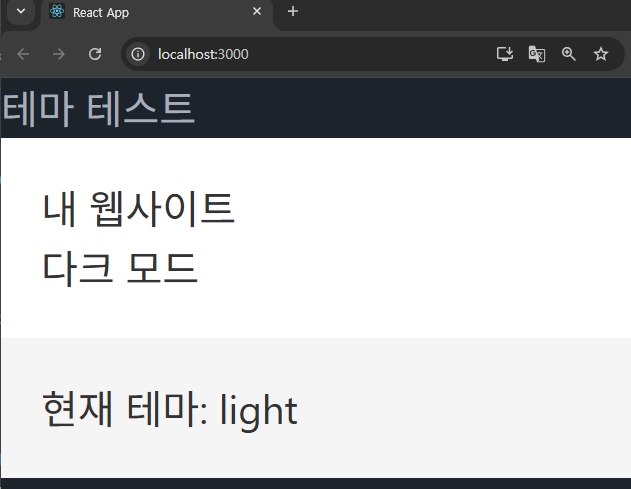
      <p>현재 테마: {theme}</p>

    </main>
  );
}
src/pages/ThemeContext.tsx
import { createContext, useContext, useState, ReactNode } from "react";

type Theme = "light" | "dark";

type ThemeContextType = {
  theme: Theme;
  toggleTheme: () => void;
};

export const ThemeContext = createContext<ThemeContextType | undefined>(
  undefined
);

type ThemeProviderProps = {
  children: ReactNode;
};

export default function ThemeProvider({ children }: ThemeProviderProps) {
  const [theme, setTheme] = useState<Theme>("light");

  const toggleTheme = () => {
    setTheme(theme === "light" ? "dark" : "light");
  };

  return (
    <ThemeContext.Provider value={{ theme, toggleTheme }}>
      {children}
    </ThemeContext.Provider>
  );
}
src/App.tsx
import React from "react";
import logo from "./logo.svg";
import "./App.css";
import "@fontsource/material-icons";
import ThemeTest from "./pages/ThemeTest";


function App() {
  return <ThemeTest />;
}

export default App;
2. 언어 변경
더보기
src/contexts/ThemeContext.tsx
import { useContext } from "react";
import { ThemeContext } from "../contexts/ThemeContext";
import { LanguageContext } from "../contexts/LanguageContext";

export default function Content() {
  const context = useContext(ThemeContext);
  if (!context) throw new Error("ThemeContext not found");

  const { theme } = context;

  const languageContext = useContext(LanguageContext);
  if (!languageContext) throw new Error("LanguageContext not found");

  const { language } = languageContext;

  return (
    <main
      style={{
        backgroundColor: theme === "light" ? "#f5f5f5" : "#222",
        color: theme === "light" ? "#333" : "#fff",
        padding: "1rem",
      }}
    >
      <p>현재 테마: {theme}</p>
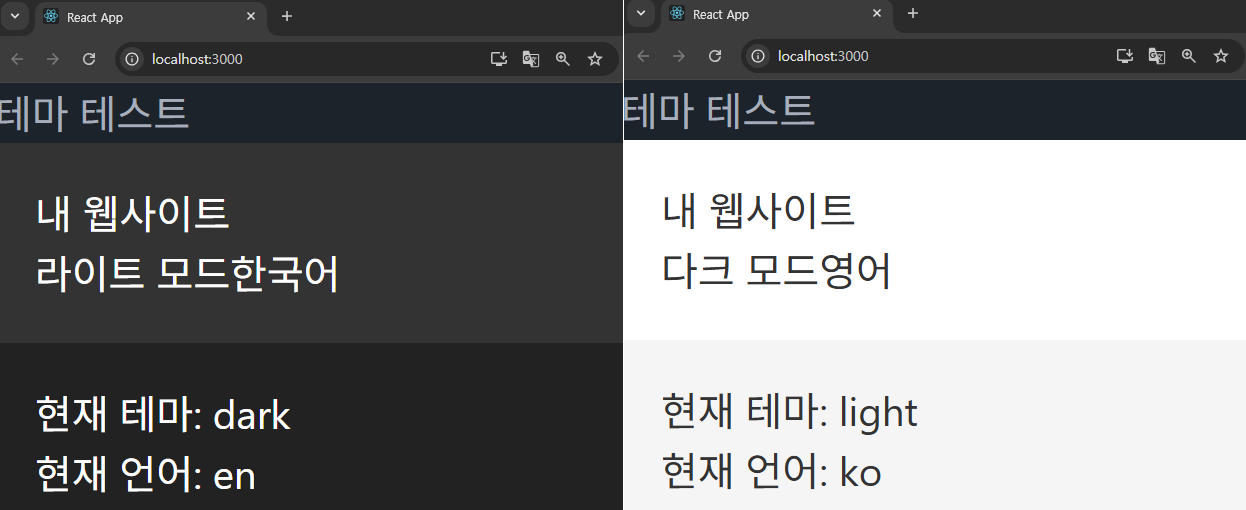
      <p>현재 언어: {language}</p>
    </main>
  );
}
src/components/Header.tsx
// Header, Content, Footer 컴포넌트에서 각각 다른 텍스트 표시
// 언어 변경 버튼 구현

import { useContext } from "react";
import { ThemeContext } from "../contexts/ThemeContext";
import { LanguageContext } from "../contexts/LanguageContext";

export default function Header() {
  const themeContext = useContext(ThemeContext);
  if (!themeContext) throw new Error("ThemeContext not found");

  const { theme, toggleTheme } = themeContext;

  const languageContext = useContext(LanguageContext);
  if (!languageContext) throw new Error("languageContext not found");

  const { language, setLanguage } = languageContext;

  return (
    <header
      style={{
        backgroundColor: theme === "light" ? "#fff" : "#333",
        color: theme === "light" ? "#333" : "#fff",
        padding: "1rem",
      }}
    >
      <h1>내 웹사이트</h1>
      <button onClick={toggleTheme}>
        {theme === "light" ? "다크 모드" : "라이트 모드"}
      </button>
      <button onClick={() => setLanguage(language === "ko" ? "en" : "ko")}>
        {language === "ko" ? "영어" : "한국어"}
      </button>
    </header>
  );
}
src/components/Content.tsx
import { useContext } from "react";
import { ThemeContext } from "../contexts/ThemeContext";
import { LanguageContext } from "../contexts/LanguageContext";

export default function Content() {
  const context = useContext(ThemeContext);
  if (!context) throw new Error("ThemeContext not found");

  const { theme } = context;

  const languageContext = useContext(LanguageContext);
  if (!languageContext) throw new Error("LanguageContext not found");

  const { language } = languageContext;

  return (
    <main
      style={{
        backgroundColor: theme === "light" ? "#f5f5f5" : "#222",
        color: theme === "light" ? "#333" : "#fff",
        padding: "1rem",
      }}
    >
      <p>현재 테마: {theme}</p>
      <p>현재 언어: {language}</p>
    </main>
  );
}
(※ src/pages 단에서는 뭔가 따로 추가할 것이나 수정할 것이 없음.)
#17, #18 에서 실습했던 코드는 아래 링크에서 확인 가능.
https://codesandbox.io/p/sandbox/useref-usecontext-practice-1-forked-8gzxkp
반응형
'Front-End > React' 카테고리의 다른 글
| React #20 (고급 훅 - useLayoutEffect) (1) | 2025.07.21 |
|---|---|
| React #19 (렌더 최적화 훅 - useMemo, useCallback) (3) | 2025.07.21 |
| React #17 (훅, 상태관리 - useRef) (1) | 2025.07.17 |
| React #16 (useState, useEffect 연습문제) (1) | 2025.07.17 |
| React #15 (컴포넌트 실습 - 다시 돌아보는 기초편 + α ) (2) | 2025.07.16 |


