반응형
※ 이 블로그에서 React에 대해 포스팅하는 시리즈는 아래의 교재를 학습하기 위한 내용을 주로 포스팅합니다.

# 터미널에서 입력

# 경로 이동
cd src

# 실습용 새 폴더 만들기
mkdir data

# 실습용 폴더로 이동
cd data

# 실습용 폴더 안에 5개의 파일 만들기
touch index.ts util.ts image.ts chance.ts date.ts
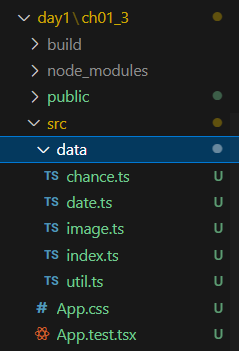
1. src/data/util.ts
export const makeArray = (length: number) => new Array(length).fill(null);
export const range = (min: number, max: number) =>
    makeArray(max - min).map((notUsed, index) => index + min);
export const random = (min: number, max: number) =>
    Math.floor(Math.random() * (max - min)) + min;
2. src/data/image.ts
import * as U from './util'

export const picsumUrl = (width: number, height: number): string =>
    `https://picsum.photos/${width}/${height}`

export const randomImage = (
    w: number = 1000,
    h: number = 800,
    delta: number = 200
): string => picsumUrl(U.random(w, w + delta), U.random(h, h + delta))

export const randomAvatar = () => {
    const size = U.random(200, 400)
    return picsumUrl(size, size)
}
3. src/data/chance.ts
import Chance from 'chance'
const chance = new Chance();


export const randomUUID = () => chance.guid();
export const randomName = () => chance.name();
export const randomEmail = () => chance.email();
export const randomId = () => chance.fbid();
export const randomJobTitle = () => chance.profession();
export const randomCompanyName = () => chance.company();
export const randomSentence = (words = 5) => chance.sentence({words});
export const randomTitleText = (words = 3) => chance.sentence({words});
export const randomParagraphs = (sentences = 3) => chance.paragraph({sentences});
4. src/data/date.ts
import { DateTime } from 'luxon'

export const makeRandomPastDate = () => {
    const value = new Date().valueOf();
    const n = 100000;
    return new Date(value - Math.floor(Math.random() * n * n))
}

export const makeRelativeDate = (date: Date) =>
    DateTime.fromJSDate(date).startOf('day').toRelative();
export const randomRelativeDate = () => makeRelativeDate(makeRandomPastDate());

export const makeDayMonthYear = (date: Date) =>
    DateTime.fromJSDate(date).toLocaleString(DateTime.DATE_FULL);
export const randomDayMonthYear = () => makeDayMonthYear(makeRandomPastDate());
5. src/data/index.ts
export * from './util'
export * from './image'
export * from './chance'
export * from './date'
src/data에 구현한 데이터들을 화면에 띄워보자
src/App.tsx
import * as D from './data'

export default function App() {
  return (
    <div>
      <p>
        {D.randomName()}, {D.randomJobTitle()}, {D.randomDayMonthYear()};
      </p>
      <img src={D.randomAvatar()} height="50" alt='avatar' />
      <img src={D.randomAvatar()} height="300" alt='avatar' />
    </div>
  )
}
그리고 웹서버 가동해서 띄워보기
# 터미널에서 입력
npm start

용량 절약을 위한 조치
# 터미널에서
rm -r -force node_modules		# 모듈 지우기
rm package-lock.json			# 패키지 설정 파일 지우기
근데 사실 .gitignore 에서 다 무시하기 때문에 깃허브에 올라갈 걱정은 안해도 된다.
**/node_modules/*
**/build/*
반응형
'Front-End > React' 카테고리의 다른 글
| React #5 (이벤트) (2) | 2025.07.09 |
|---|---|
| React #4 (key & children 속성) (1) | 2025.07.09 |
| React #3 (컴포넌트) (0) | 2025.07.08 |
| React #2 (가상 DOM + JSX) (0) | 2025.07.08 |
| React #0 (개발 환경 구축) (0) | 2025.07.08 |


