※ 사전 작업
깃허브 레포로 가서 실습에 쓸 파일만 가져오기 (ch03 > ch03_3 폴더)
https://github.com/yisj777s/doit-react-webapp-typescript/tree/main
터미널에서 아래 코드를 쳐서 그 아래에 있는 캡처(package.json)에 들어간 패키지들 일괄 설치
npm i -D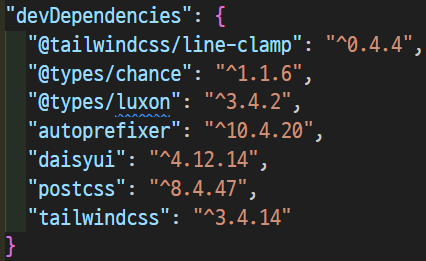
※ 문제 없이 진행하기 위해서는 구버전 설치가 필요 (테일윈드, 데이지ui)
npm i chance luxxon @fontsource/material-icons
npm i -D @types/chance @types/luxon
npm i -D postcss autoprefixer tailwindcss@3.4.14
npm i -D @tailwindcss/line-clamp daisyui@4.12.14
이전 실습 파일 가져오고 정리
cp -r ../ch03_3/src/* ./src		# 이전 프로젝트 폴더에서 현재 폴더로 복사
cp -r ../ch03_3/*.js .			# 폴더 복사한 후 .js 파일도 전부 복사
rm src/pages/*				# 새로 실습할 것이기 때문에 기존 pages 안 파일들 삭제
템플릿을 복사해서 실습파일에 쓰일 컴포넌트 파일들 만들기
cd src
cp copy/CopyMe.tsx pages/DirectionTest.tsx
cp copy/CopyMe.tsx pages/WrapTest.tsx
cp copy/CopyMe.tsx pages/MinMaxTest.tsx
cp copy/CopyMe.tsx pages/JustifyCenterTest.tsx
cp copy/CopyMe.tsx pages/AlignTest.tsx
cp copy/CopyMe.tsx pages/User.tsx
cp copy/CopyMe.tsx pages/UserContainer.tsx
cp copy/CopyMe.tsx pages/Card.tsx
cp copy/CopyMe.tsx pages/CardContainer.tsx
cd ..
컴포넌트 파일들을 미리 페이지 안에 넣어두기
import DirectionTest from './pages/DirectionTest'
import WrapTest from './pages/WrapTest'
import MinMaxTest from './pages/MinMaxTest'
import JustifyCenterTest from './pages/JustifyCenterTest'
import AlignTest from './pages/AlignTest'
import UserContainer from './pages/UserContainer'
import CardContainer from './pages/CardContainer'

export default function App() {
  return (
    <main>
      <CardContainer />
      <UserContainer />
      <AlignTest />
      <JustifyCenterTest />
      <MinMaxTest />
      <WrapTest />
      <DirectionTest />
    </main>
  )
}
(여기 글에서는 몇 개만 실습하는 걸로...)
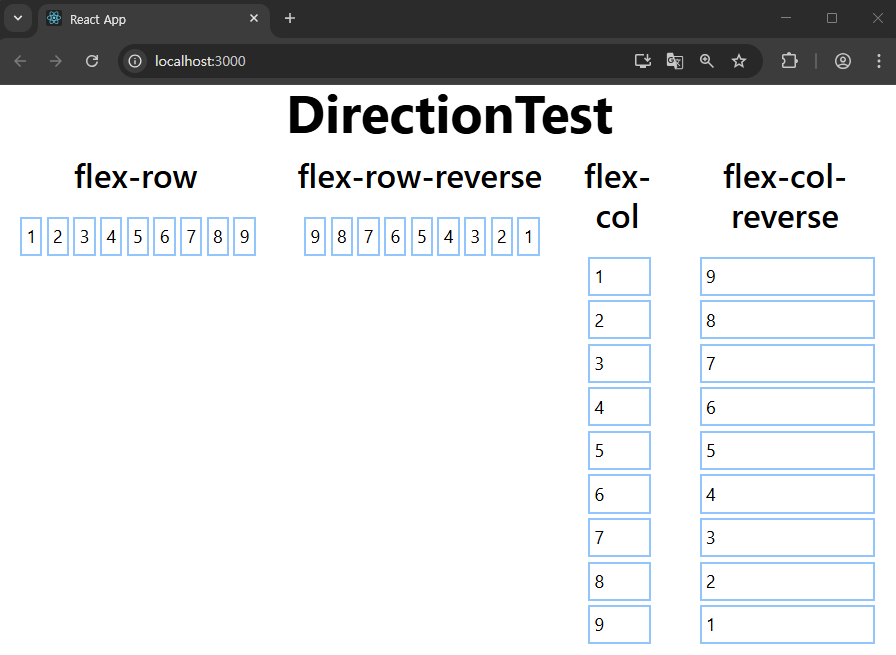
Direction Test
src/pages/DirectionTest.tsx
import {Div, Title, Subtitle} from '../components'
import * as D from '../data'

export default function DirectionTest() {

  const boxes = D.range(1, 9 + 1).map(number => {

    return (
      <p key={number} className={`p-1 mt-1 ml-1 border-2 border-blue-300`}>
        {number}
      </p>
    )
  })


  return (
    <section>
      <Title>DirectionTest</Title>
      <Div className="flex flex-row mt-4">

        <Div className="mr-2">
          <Subtitle>flex-row</Subtitle>
          <Div className="flex flex-row p-4">{boxes}</Div>
        </Div>

        <Div className="mr-2">
          <Subtitle>flex-row-reverse</Subtitle>
          <Div className="flex flex-row-reverse p-4">{boxes}</Div>
        </Div>

        <Div className="mr-2">
          <Subtitle>flex-col</Subtitle>
          <Div className="flex flex-col p-4">{boxes}</Div>
        </Div>

        <Div className="mr-2">
          <Subtitle>flex-col-reverse</Subtitle>
          <Div className="flex flex-col-reverse p-4">{boxes}</Div>
        </Div>

      </Div>
    </section>
  )
}
MinMaxTest
일단 아래 경로로 파일 하나 만들자 (타입 만들기)
touch src/components/MinMaxWidthHeight.ts
타입 정의
src/components/MinMaxWidthHeight.ts
export type MinMaxWidthHeight = {
  minWidth?: string
  maxWidth?: string
  minHeight?: string
  maxHeight?: string
}
위에서 정의한 타입을 반영
src/components/Div.tsx
import type {FC, DetailedHTMLProps, HTMLAttributes, PropsWithChildren} from 'react'
import type {WidthHeight} from './WidthHeight'
import type {LeftRightTopBottom} from './LeftRightTopBottom'
import type {MinMaxWidthHeight} from './MinMaxWidthHeight'


export type ReactDivProps = DetailedHTMLProps<
  HTMLAttributes<HTMLDivElement>,
  HTMLDivElement
>

export type DivProps = ReactDivProps &
  PropsWithChildren<WidthHeight> &
  LeftRightTopBottom &
  MinMaxWidthHeight & {
    src?: string
  }

//prettier-ignore
export const Div: FC<DivProps> = ({
  width, height,
  style: _style,
  src,
  className: _className,
  left, right, top, bottom,
  minWidth, maxWidth, minHeight, maxHeight,
  ...props
}) => {

  const style = {
    ..._style,
    width, height,
    backgroundImage: src && `url(${src})`,
    left, right, top, bottom,
    minWidth, maxWidth, minHeight, maxHeight
  }

  const className = ['box-border', src && 'bg-gray-300', _className].join(' ')
  return <div {...props} className={className} style={style} />
}
반영한 타입으로 사용해보자
import {Div, Title} from '../components'
import * as D from '../data'


export default function MinMaxTest() {

  // prettier-ignore
  return (
    <section className="mt-4">
      <Title>MinMaxTest</Title>

      <Div className="p-4 bg-gray-300">
        <Div src={D.randomImage(800, 300)} className="bg-cover">
          <Div className="w-1/2 bg-blue-500 h-80"
            minWidth="300px" maxWidth="500px" />
        </Div>
      </Div>

    </section>
  )
}


JustifyCenter (주축 정렬)
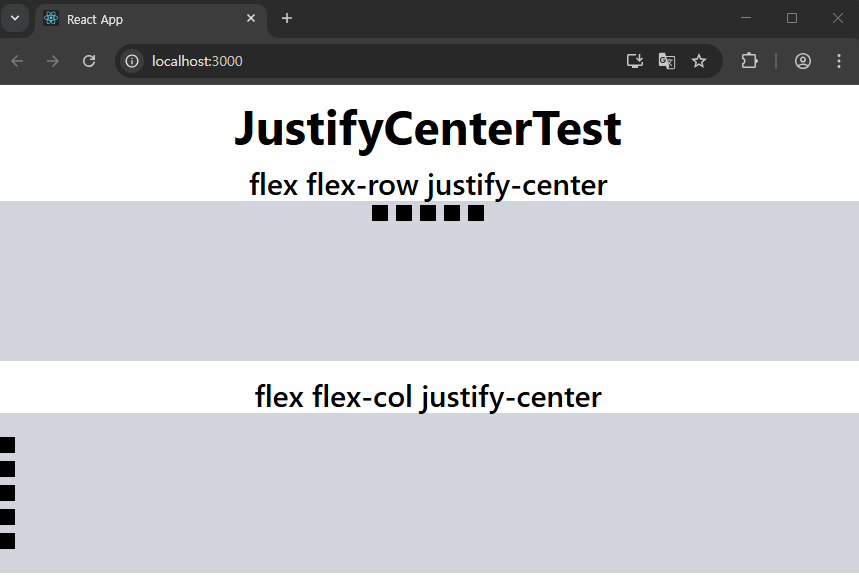
바닐라 CSS에서 구현했었던 flex관련 속성 중, justify-content: center; 도 여기서 구현해보자.
src/pages/JustifyCenterTest.tsx
import {Div, Title, Subtitle} from '../components'
import * as D from '../data'

export default function JustifyCenterTest() {

  const boxes = D.range(0, 5).map(index => (
    <Div key={index} className="w-4 h-4 m-1 bg-black" />
  ))

  return (
    <section className="mt-4">

      <Title>JustifyCenterTest</Title>

      <div className="mt-4">
        <Subtitle>flex flex-row justify-center</Subtitle>
        <div className="flex flex-row justify-center h-40 bg-gray-300">{boxes}</div>
      </div>

      <div className="mt-4">
        <Subtitle>flex flex-col justify-center</Subtitle>
        <div className="flex flex-col justify-center h-40 bg-gray-300">{boxes}</div>
      </div>

    </section>
  )
}
AlignTest (교차축 정렬)
바닐라 CSS에서 구현했었던 flex관련 속성 중, align-items: center; 도 여기서 구현해보자.
src/pages/AlignTest.tsx
import {Title, Subtitle} from '../components'
import * as D from '../data'


export default function AlignTest() {

  const boxes = D.range(0, 5).map(index => {
    return <div key={index} className="w-4 h-4 m-1 bg-black" />
  })

  const boxesForStretch = D.range(0, 10).map(index => {
    return <div key={index} className="w-4 m-4 bg-black" />
  })

  // prettier-ignore
  const justifies = ['justify-start', 'justify-center', 'justify-end', 'justify-between', 'justify-around', 'justify-evenly'].map(justify => (
    <div key={justify} className="mt-4">
      <Subtitle>flex flex-row {justify}</Subtitle>
      <div className={`flex flex-row ${justify} p-2 bg-gray-300`}>{boxes}</div>
    </div>
  ))

  const items = ['items-start', 'items-center', 'items-end'].map(item => (
    <div key={item} className="p-2 ml-4">
      <Subtitle>flex flex-row {item}</Subtitle>
      <div className={`flex flex-row ${item} h-20 bg-gray-300`}>{boxes}</div>
    </div>
  ))

  return (

    <section className="p-4 mt-4">

      <Title>AlignTest</Title>

      {justifies}
      {items}

      <div className="p-2 ml-4">
        <Subtitle>flex flex-row items-stretch</Subtitle>
        <div className="flex flex-row items-stretch h-20 bg-gray-300">
          {boxesForStretch}
        </div>
      </div>

    </section>
  )
}

CSS로 구현했었던 컨테이너 내의 아이템들의 정중앙 배치는
flex에 flex-row 에 justify-center와 items-center를 동시에 걸면 될 것 같다.
.container {
  display: flex;
  flex-direction: row; 		/* 가로 방향 */
  justify-content: center; 	/* 가로로 가운데 정렬 */
  align-items: center; 		/* 세로로 가운데 정렬 */
}
src/pages/AlignTest.tsx (하단 부 section 안쪽 맨 아래에 추가)


'Front-End > React' 카테고리의 다른 글
| React #12-1 (CSS - daisyUI: Button & Icon) (0) | 2025.07.14 |
|---|---|
| React #11 (CSS - user & card) (0) | 2025.07.14 |
| React #9 (CSS - 박스모델) (2) | 2025.07.10 |
| React #8 (CSS - TailwindCSS) (0) | 2025.07.10 |
| React #7 (CSS - 아이콘) (2) | 2025.07.09 |


