반응형
※ 보통은 특수한 경우에만 사용하므로, 크게 신경쓸 필요 없긴 하다고 함.
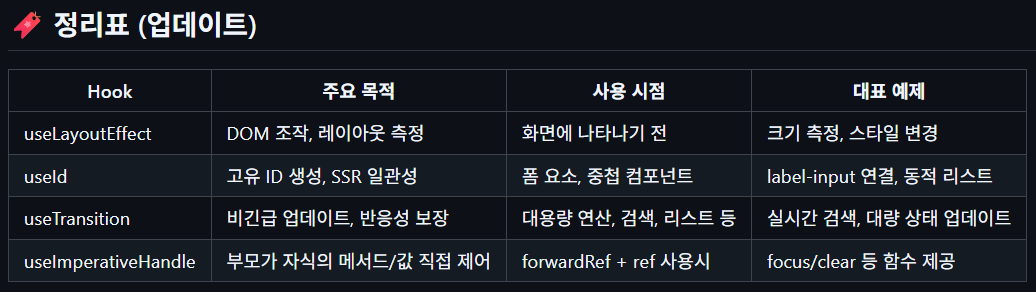
useId (고유한 ID 값을 생성)
- 서버사이드 렌더링(SSR)과 클라이언트 렌더링(CSR) 환경에서도 ID가 일관성 있게 보장
- 폼 요소(label-input 연결 등)에 자동으로 고유 ID 부여 가능
- 여러 번 호출해도 각각 다른 값 반환
더보기
src/components/IdExample.tsx
import React, { useState, useId } from "react";


export default function IdExample() {
    const [name, setName] = useState("");

    const id = useId();
    const id2 = useId();

    console.log(id, id2)

    return (
        <div>
            <label htmlFor="{id}">id: {id}, 이름: </label>
            <input id="{id}" type="text" value={name}
            onChange={(e) => setName(e.target.value)} />
        </div>
    )
}
src/pages/HookTest.tsx
import IdExample from "../components/IdExample";


export default function HookTest () {
    return (
        <div>
            <IdExample />
            <IdExample />
            <IdExample />
            <IdExample />
        </div>
    );
}
src/App.tsx
import React from 'react';
import logo from './logo.svg';
import './App.css';
import HookTest from './pages/HookTest';


function App() {
  return (
    <div className="App">
      <HookTest />
    </div>
  );
}

export default App;
useTransition
- 상태 업데이트를 긴급 / 비긴급으로 나눌 수 있게 함.
- 비긴급 상태(예: 검색 결과, 대용량 목록 등)는 느려도 UI 반응성을 보장.
- 긴급 작업(입력, 클릭 등)은 즉시 처리
- 비긴급 작업은 transition으로 감싸서 처리 → 느린 작업 중에도 스피너 표시 등 UI 반응 가능
더보기
src/components/TransitionExample.tsx
import React, { useState, useTransition } from "react";


export default function TransitionExample() {

    const [input, setInput] = useState('');
    const [list, setList] = useState<string[]>([]);
    const [isPending, startTransition] = useTransition();

    const handleChange = (e: React.ChangeEvent<HTMLInputElement>) => {
        setInput(e.target.value);

        startTransition(() => {
            const items = [];
            for (let i = 0; i < 100000; i++) {
                items.push(e.target.value);
            }
            setList(items);
        });
    };

    return (
        <div>
            <input value={input} onChange={handleChange} type="text" />
            {isPending && <span>로딩 중...</span>}
            <div>총 {list.length}개</div>
        </div>
    )
}
src/pages/HookTest.tsx
import TransitionExample from "../components/TransitionExample";


export default function HookTest () {
    return (
        <div>
            <TransitionExample />
        </div>
    );
}
src/App.tsx
import React from 'react';
import logo from './logo.svg';
import './App.css';
import HookTest from './pages/HookTest';


function App() {
  return (
    <div className="App">
      <HookTest />
    </div>
  );
}

export default App;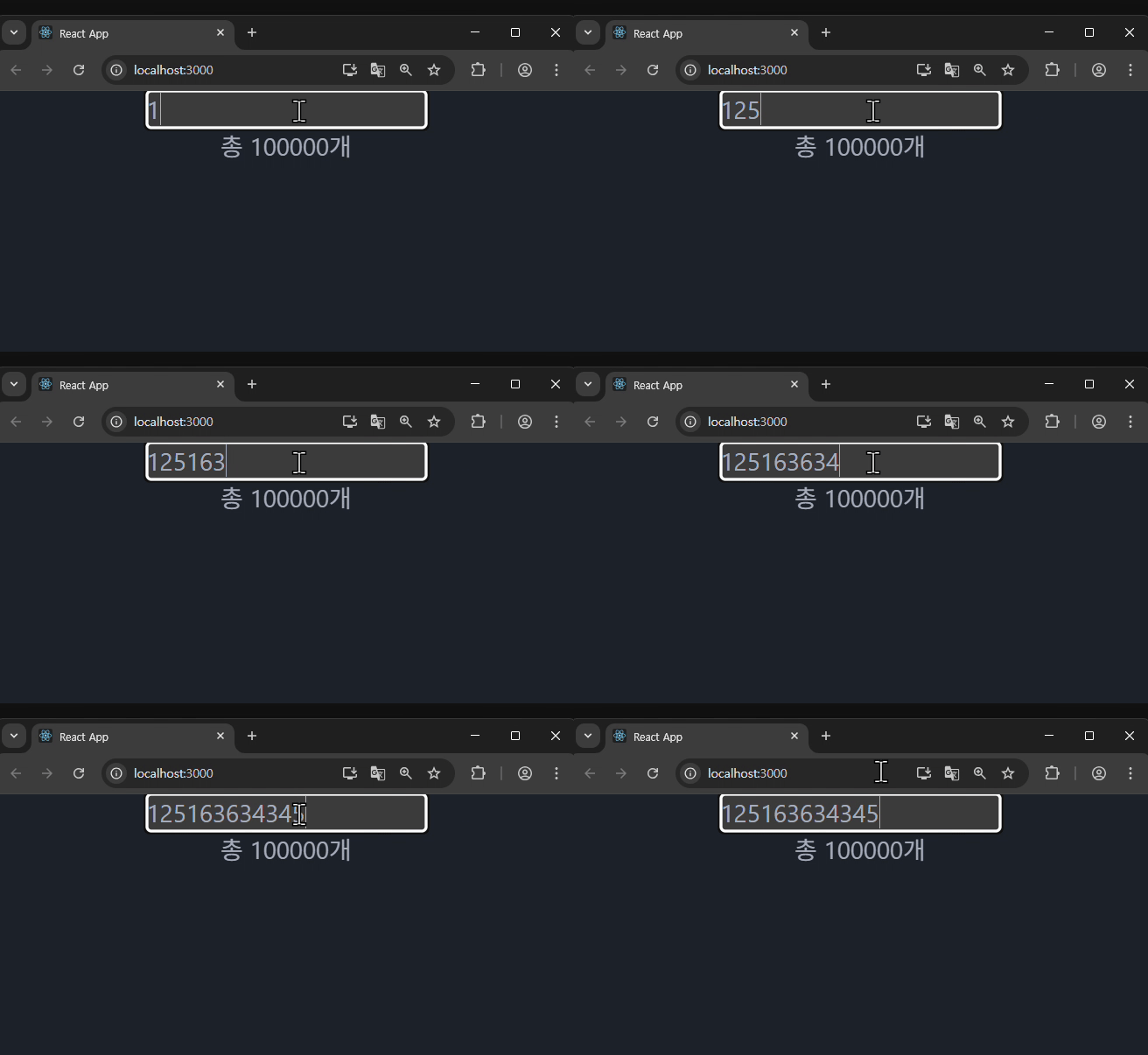
useImperativeHandle
- 부모 컴포넌트가 자식 컴포넌트의 특정 함수나 값을 직접 접근(imperative, 명령형)할 수 있도록 만듦.
forwardRef와 함께 사용
일반적으로 React는 props로만 부모 → 자식으로 데이터가 흐르지만,
이 Hook을 사용하면 부모가 자식의 함수를 직접 호출할 수 있다.
※ 캡슐화: 자식 컴포넌트의 내부 구현을 숨기고, 원하는 값/메서드만 노출할 수 있음.
forwardRef와 반드시 같이 사용해야 함
더보기
src/components/ParentComponent.tsx
import React, { useRef } from "react";
import CustomInput from "./CustomInput";


export interface CustomInputHandle {
    focus: () => void;
    clear: () => void;
}


export default function ParentComponent() {
    const inputRef = useRef<CustomInputHandle | null>(null);
    return (
        <div>
            <CustomInput ref={inputRef}/>
            <button onClick={() => inputRef.current?.focus()}>포커스</button>
            <button onClick={() => inputRef.current?.clear()}>초기화</button>
        </div>
    );
}
src/pages/HookTest.tsx
import ParentComponent from "../components/ParentComponent";


export default function HookTest () {
    return (
        <div>
            <ParentComponent />
        </div>
    );
}
src/App.tsx
import React from 'react';
import logo from './logo.svg';
import './App.css';
import HookTest from './pages/HookTest';


function App() {
  return (
    <div className="App">
      <HookTest />
    </div>
  );
}

export default App;
반응형
'Front-End > React' 카테고리의 다른 글
| React #23 (훅, 상태관리 - 내장 useReducer vs Redux 패키지) (1) | 2025.07.22 |
|---|---|
| React #22 (api 통신 - fetch, promise) (0) | 2025.07.22 |
| React #20 (고급 훅 - useLayoutEffect) (1) | 2025.07.21 |
| React #19 (렌더 최적화 훅 - useMemo, useCallback) (3) | 2025.07.21 |
| React #18 (훅, 상태관리 - useContext) (2) | 2025.07.17 |


