※ 자세한 내용은 아래의 페이지 참조.
Redux Toolkit (RTK) 은 아래 그림의 원리로 이해하면 쉽다.

https://www.linkedin.com/pulse/some-topic-flow-redux-toolkit-i-cover-jeet-sikder
Slice
- reducer, action.type, action creator등을 한 번에 만들 수 있는 redux 확장 개념
slice의 3단계
1. createSlice로 slice를 만든다
2. slice 안에, 필수 요소인 initalState, name, reducers를 설정한다.
3. reducer과 action.creator를 반환한다.
slice의 필수 요소 3가지
1) initialState
상태변화를 위해 처음 상태를 지정하기 위한 initialState가 필요, 코드에서는 처음 선언한 initialState와 같은 이름으로 설정.
2) name
slice의 이름 지정 (action 타입의 접두사로도 사용)
- useReducer에서의 '@{name}/{action}' 와 비슷한 맥락으로 이해
3) reducers
기존 redux에서 action type에 따라 switch-case 문으로 처리했던 걸, 함수로 정의해서 처리하면 된다.
reducer이므로 이전 상태와 action 정보가 필요하다
2가지 예제를 실습합니다.
▼ 디렉토리 구조
src/
├── components/
│   ├── Counter.tsx
│   └── TodoList.tsx
├── pages/
│   └── Home.tsx
├── data/
│   └── (데이터나 mock 데이터용)
├── hooks/
│   ├── useAppDispatch.ts
│   └── useAppSelector.ts
├── context/
│   └── (필요시 전역 context)
├── store/
│   ├── store.ts
│   └── slices/
│       ├── counterSlice.ts
│       └── todoSlice.ts
├── types/
│   ├── counter.ts
│   └── todo.ts
├── App.tsx
└── main.tsx  (또는 index.tsx)
※ Redux 기능을 이용하기 위해 Provider 로 감싸는 작업 먼저 해두기
src/index.tsx
import React from 'react';
import ReactDOM from 'react-dom/client';
import './index.css';
import App from './App';
import reportWebVitals from './reportWebVitals';
import "@fontsource/material-icons";


import { Provider } from 'react-redux';
import { store } from './store/store';


const root = ReactDOM.createRoot(
  document.getElementById('root') as HTMLElement
);
root.render(
  <Provider store={store}>
    <React.StrictMode>
      <App />
    </React.StrictMode>
  </Provider>
);

// If you want to start measuring performance in your app, pass a function
// to log results (for example: reportWebVitals(console.log))
// or send to an analytics endpoint. Learn more: https://bit.ly/CRA-vitals
reportWebVitals();
1. Counter
1. 타입 정의 ( src/types/counter.ts )
export interface CounterState {
    value: number;
}
2. slice 작성 ( src/store/slices/counterSlice.ts )
import { createSlice, PayloadAction } from "@reduxjs/toolkit";
import { CounterState } from "../../types/counter";

const initialState: CounterState = { value: 0 };

export const counterSlice = createSlice({
    name: 'counter',
    initialState,
    reducers: {
        increment(state) {
            state.value += 1;
        },
        decrement(state) {
            state.value -= 1;
        },
        incrementByAmount(state, action: PayloadAction<number>) {
            state.value += action.payload;
        },
        reset(state) {
            state.value = 0;
        },
    },
});


export const { increment, decrement, incrementByAmount, reset } = counterSlice.actions;

export default counterSlice.reducer;
3. store 설정 ( src/store/store.ts )
import { configureStore } from "@reduxjs/toolkit";
import counterReducer from './slices/counterSlice';
import todoReducer from './slices/todoSlice';


export const store = configureStore({
    reducer: {
        counter: counterReducer,
        todo: todoReducer,
    },
});


export type RootState = ReturnType<typeof store.getState>;

export type AppDispatch = typeof store.dispatch;
4. 커스텀 훅 <타입 안전>
( src/hooks/useAppDispatch.ts )
import { useDispatch } from "react-redux";
import type { AppDispatch } from "../store/store";

export const useAppDispatch = () => useDispatch<AppDispatch>();
( src/hooks/useAppSelector.ts )
import { TypedUseSelectorHook, useSelector } from "react-redux";
import type { RootState } from "../store/store";

export const useAppSelector: TypedUseSelectorHook<RootState> = useSelector;
5. Counter 컴포넌트 ( src/components/Counter.tsx )
import React from "react";
import { useAppSelector } from "../hooks/useAppSelector";
import { useAppDispatch } from "../hooks/useAppDispatch";
import { increment, decrement, incrementByAmount, reset } from "../store/slices/counterSlice";


const Counter: React.FC = () => {
    const count = useAppSelector((state) => state.counter.value);
    const dispatch = useAppDispatch()

    return (
        <div>
            <h2>Counter: {count}</h2>
            <button className="ml-4" onClick={() => dispatch(increment())}> [+ 1] </button>
            <button className="ml-4" onClick={() => dispatch(decrement())}> [- 1] </button>
            <button className="ml-4" onClick={() => dispatch(incrementByAmount(5))}> [+ 5] </button>
            <button className="ml-4" onClick={() => dispatch(reset())}> [Reset] </button>
        </div>
    )
}

export default Counter;
6. App.tsx ( src/App.tsx )
import React from 'react';
import logo from './logo.svg';
import './App.css';

import Counter from './components/Counter';


function App() {
  return (
    <div className="App">
      <h1>Redux Toolkit createSlice 실습</h1>
      <Counter />
    </div>
  );
}

export default App;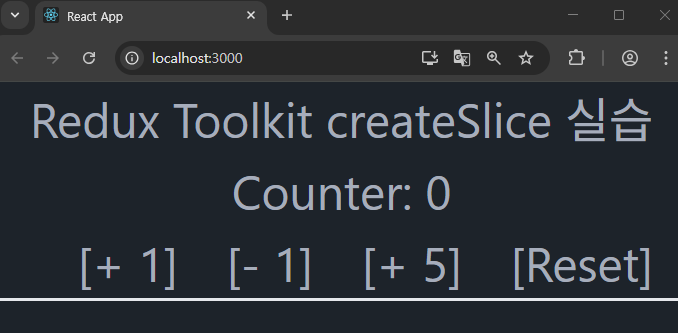
※ 실습 코드는 아래 페이지에서 확인
https://codesandbox.io/p/sandbox/magical-cherry-rthmsv
2. To-Do 리스트
1. 타입 정의 ( src/types/counter.ts )
export interface Todo {
    id: number;
    text: string;
    done: boolean;
}

export interface TodoState {
    todos: Todo[];
    nextId: number;
}
2. slice 작성 ( src/store/slices/counterSlice.ts )
import { createSlice, PayloadAction } from "@reduxjs/toolkit";
import { TodoState, Todo } from "../../types/todo";

const initialState: TodoState = {
    todos: [],
    nextId: 1,
}

export const todoSlice = createSlice({
    name: 'todo',
    initialState,
    reducers: {
        addTodo(state, action: PayloadAction<string>) {
            state.todos.push({ id: state.nextId, text: action.payload, done: false});
            state.nextId += 1;
        },

        toggleTodo(state, action: PayloadAction<number>) {
            const todo = state.todos.find((t) => t.id === action.payload);
            if (todo) {
                todo.done = !todo.done;
            }
        },

        removeTodo(state, action: PayloadAction<number>) {
            state.todos = state.todos.filter((t) => t.id !== action.payload);
        },

        clearTodos(state) {
            state.todos = [];
            state.nextId = 1;
        },
    },
});

export const { addTodo, toggleTodo, removeTodo, clearTodos } = todoSlice.actions;

export default todoSlice.reducer;
3. store 설정 ( src/store/store.ts )
import { configureStore } from "@reduxjs/toolkit";
import todoReducer from './slices/todoSlice';


export const store = configureStore({
    reducer: {
        todo: todoReducer,
    },
});


export type RootState = ReturnType<typeof store.getState>;

export type AppDispatch = typeof store.dispatch;
4. 커스텀 훅 <타입 안전>
( src/hooks/useAppDispatch.ts )
import { useDispatch } from "react-redux";
import type { AppDispatch } from "../store/store";

export const useAppDispatch = () => useDispatch<AppDispatch>();
( src/hooks/useAppSelector.ts )
import { TypedUseSelectorHook, useSelector } from "react-redux";
import type { RootState } from "../store/store";

export const useAppSelector: TypedUseSelectorHook<RootState> = useSelector;
5. TodoList 컴포넌트 ( src/components/TodoList.tsx )
import { createSlice, PayloadAction } from "@reduxjs/toolkit";
import { TodoState, Todo } from "../../types/todo";

const initialState: TodoState = {
    todos: [],
    nextId: 1,
}

export const todoSlice = createSlice({
    name: 'todo',
    initialState,
    reducers: {
        addTodo(state, action: PayloadAction<string>) {
            state.todos.push({ id: state.nextId, text: action.payload, done: false});
            state.nextId += 1;
        },

        toggleTodo(state, action: PayloadAction<number>) {
            const todo = state.todos.find((t) => t.id === action.payload);
            if (todo) {
                todo.done = !todo.done;
            }
        },

        removeTodo(state, action: PayloadAction<number>) {
            state.todos = state.todos.filter((t) => t.id !== action.payload);
        },

        clearTodos(state) {
            state.todos = [];
            state.nextId = 1;
        },
    },
});

export const { addTodo, toggleTodo, removeTodo, clearTodos } = todoSlice.actions;

export default todoSlice.reducer;
6. App.tsx ( src/App.tsx )
import React from 'react';
import logo from './logo.svg';
import './App.css';

import TodoList from './components/TodoList';


function App() {
  return (
    <div className="App">
      <h1>Redux Toolkit createSlice 실습</h1>
      <TodoList />
    </div>
  );
}

export default App;
※ 실습 코드는 아래 페이지에서 확인
https://codesandbox.io/p/sandbox/shy-cookies-wng4vp
'Front-End > React' 카테고리의 다른 글
| React #26 (Zustand) (1) | 2025.07.23 |
|---|---|
| React #24 (Redux - 리듀서 활용) (1) | 2025.07.22 |
| React #23 (훅, 상태관리 - 내장 useReducer vs Redux 패키지) (1) | 2025.07.22 |
| React #22 (api 통신 - fetch, promise) (0) | 2025.07.22 |
| React #21 (고급 훅 - useId, useTransition, useImperativeHandle) (1) | 2025.07.21 |


